
ADAPTIVE MT5 INTELLIGENCE
Open an MT5 demo.
Start with the right tools.
Choose your broker and register to get access to Adaptive AI Scanner, Adaptive AI Trader and GuruTrader training materials. Learn the platform and test your settings on demo.
Your MT5 starter pack
- Scanner + Trader
- Course and setup guides
- Webinar invitation
Partner link: GuruTrader.com may receive compensation.
Market state exampleBALANCEDExample only, not live data
Several chart periodsM15 · H1 · H4 · D1
Your 4-step journeyStart with four simple steps
Two tools. One simple plan.
First find the market. Then follow your rules.
The Scanner helps you decide what to check. The Trader can execute trades automatically according to rules you set in advance. You stay in control of every decision and risk setting.
Adaptive AI Scanner
See which markets may be worth checking.
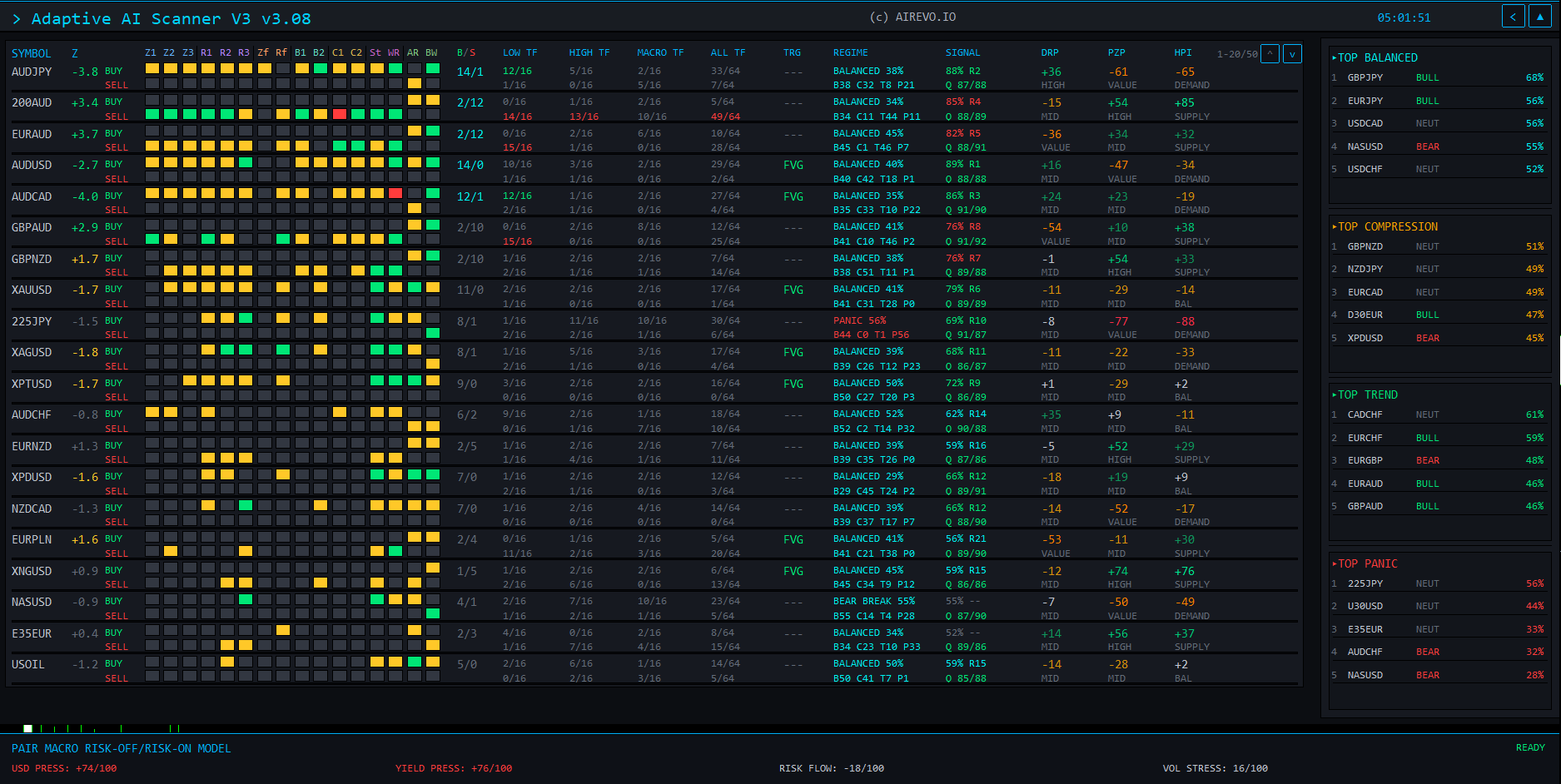
Compare many instruments and timeframes in one clear table, then open the chart for a closer look.
- Compare many markets in one place
- See direction, strength and important zones
- Find trading opportunities
Adaptive AI Trader
Automatic trades. Your rules.
The Trader can open and manage trades using your settings. Always test it on demo first.
- Set clear entry and exit rules
- Control trade size and risk settings
- Review every change on a demo account
See the real product
Three views that make the market easier to read.
First, the Scanner finds markets to check. The next views show what is happening directly on the chart.
01 · Main dashboardOriginal MT5 product view

Main dashboard
Compare many markets and quickly choose which ones to check.
See what the tools show on a real chart
Move from a market list to a clearer chart.
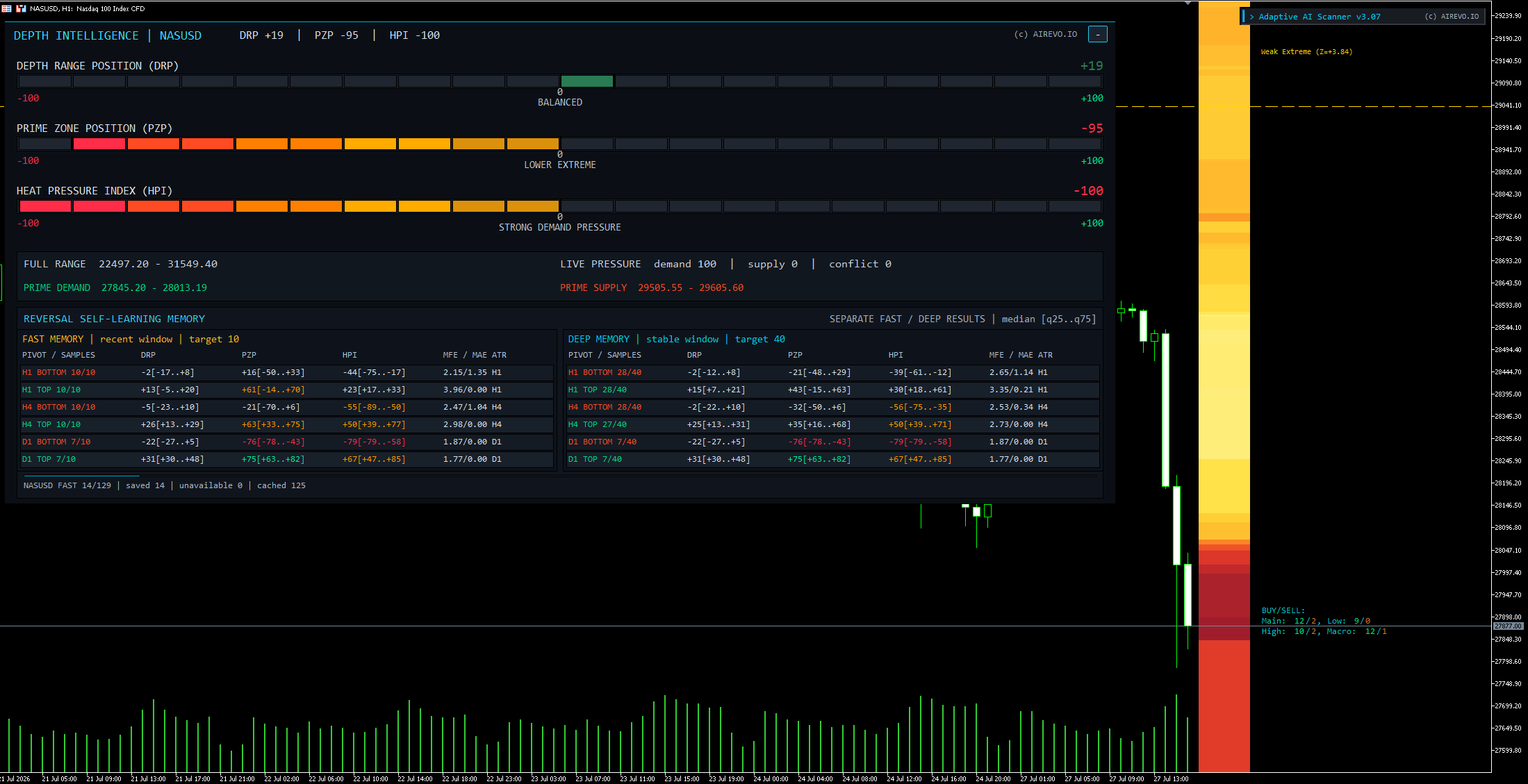
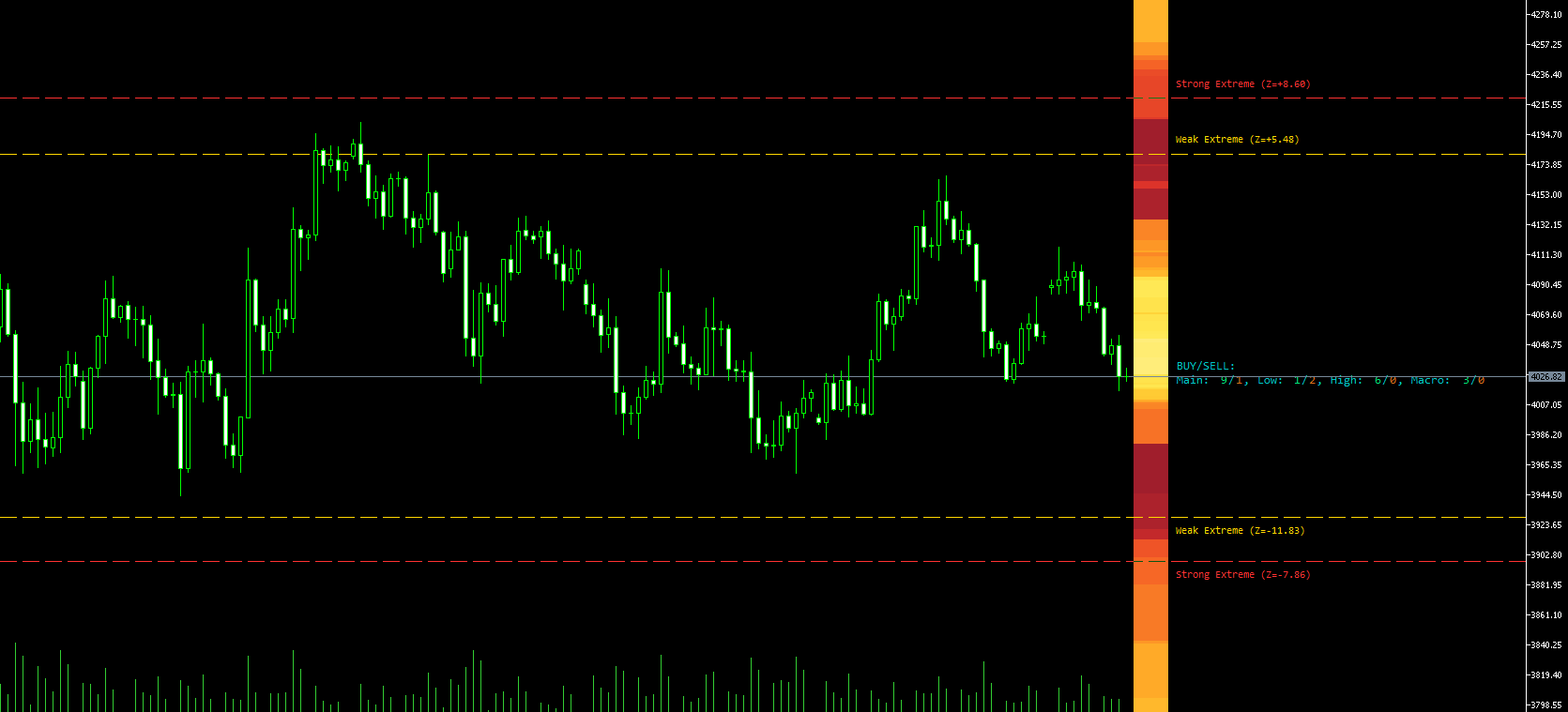
The dashboard helps you choose a market. Depth Intelligence shows where price sits and how strong the pressure is. The heatmap marks important areas on the chart.
01 · Depth Intelligence
Depth Intelligence
Three bars show price position and buying or selling pressure. FAST and DEEP tables summarise similar past situations. They help with analysis but do not predict the future.
02 · Chart heatmap
Chart heatmap
Coloured bands show when price is close to an important area. Price may stop, reverse or continue through it. No zone guarantees a result.
Free learning centre
Learn the basics before you automate.
Short guides explain automatic trading, MT5 and risk in normal language. No programming knowledge is needed.
01
How automatic trading works
A trading idea becomes a set of clear rules that a computer can repeat.
- Turn an idea into simple rules
- Test the rules on old and new data
- Check costs and possible losses
02
Manual or automatic trading
A computer can repeat rules, but a person still chooses the plan and controls the risk.
- What software can do well
- What still needs human judgement
- How to combine both approaches
03
Your first MT5 demo
Install MT5, open a demo account and learn one simple routine with the Scanner.
- Set up the platform
- Install the Scanner
- Scan, choose a market and open its chart
Free live webinar
See the tools working on an MT5 demo account.
A beginner-friendly live session showing the Scanner, automatic trading and the first MT5 steps.
Free session. No programming needed.
Read the MT5 guideDates in preparationWebinar dates are being prepared. Explore the available guides in the meantime.
MT5 · DEMO
From the first scan to your first demo test.
- 01Live product tour
- 02A simple chart example
- 03MT5 demo setup
- 04Questions and answers
Clear answers before you start
Common questions before you start.
Simple answers about the Scanner, demo account and first steps.
What is included?
MT5 demo access from your broker, plus Adaptive AI Scanner, Adaptive AI Trader, beginner training and a webinar invitation from GuruTrader.
Does Trader work automatically?
It can open and manage trades according to your settings. Test on demo, monitor its operation and review risk limits. Automation does not guarantee results.
When is the webinar?
Dates are being prepared. Use the MT5 guide now; a calendar will be available when booking opens.
Do I need trading or programming experience?
No. You do not need to program. If you are new, start with the short course and live webinar.
Does the Scanner tell me when to buy or sell?
No. It organises data and shows which markets may be worth checking. The final decision is always yours.
Does Adaptive AI Trader guarantee profit?
No. No tool can guarantee profit. It follows saved rules, but every strategy can lose.
Why start with a demo account?
Demo lets you learn MT5 and test the tools without risking real money. Demo and real trading can behave differently.
What happens after registration?
We save your request. After registering with your chosen broker, you will receive Adaptive AI Scanner, Adaptive AI Trader and the beginner course from GuruTrader. MT5 access comes from your broker. Webinar dates are being prepared.
Which markets and providers work with the tools?
This depends on the MT5 provider and the names it uses for each market. We show the chosen demo provider before you leave GuruTrader.com.
Is the demo-account link a partner link?
Partner link: GuruTrader.com may receive compensation.
How is the site language selected?
English is the original version. The site may show an automatic translation based on your location and browser. You can return to English from the translation notice.
Your MT5 starter pack
Open demo Your demo is just the beginning.
Choose your broker and register to get access to Adaptive AI Scanner, Adaptive AI Trader and GuruTrader training materials. Learn the platform and test your settings on demo.
You will leave GuruTrader.com. Availability and registration requirements are determined by the provider. Partner link: GuruTrader.com may receive compensation.